LED Keyboard: RGB Lighting
Zayzik : LED Keyboard StudioPersonalization
4.512.99K Reviews
- Version
- 20.0.9
- Installs
- 50.00M
- Age Rating
- Everyone
Screenshots
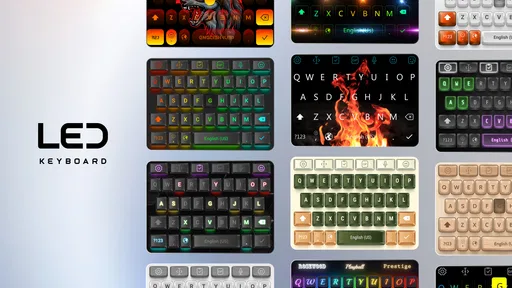
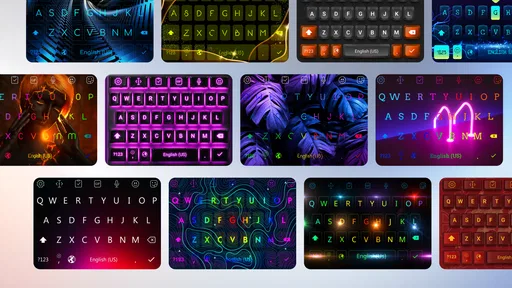
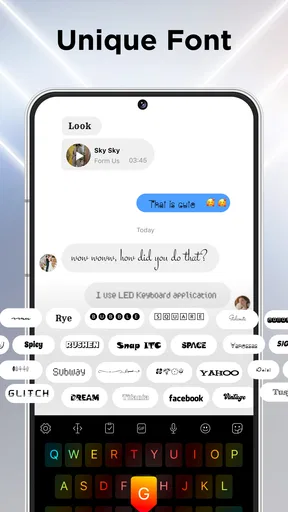
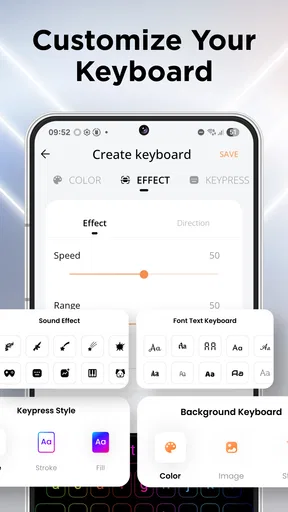
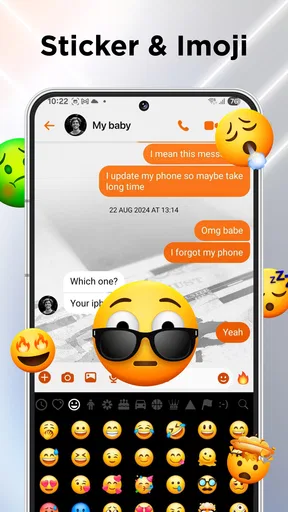
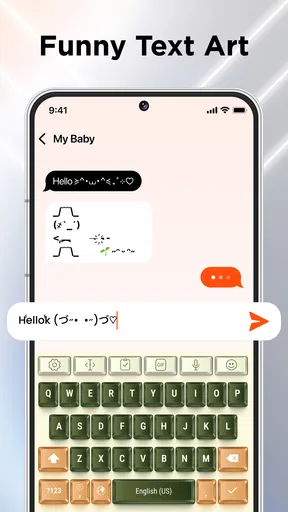
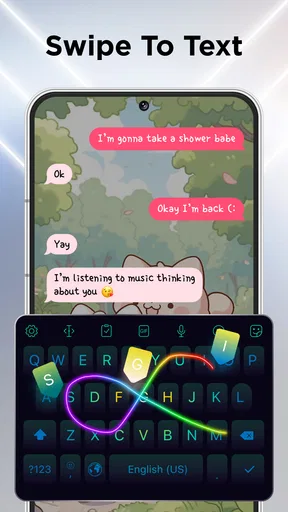
Our Review of LED Keyboard: RGB Lighting
 Analysis by Appyee
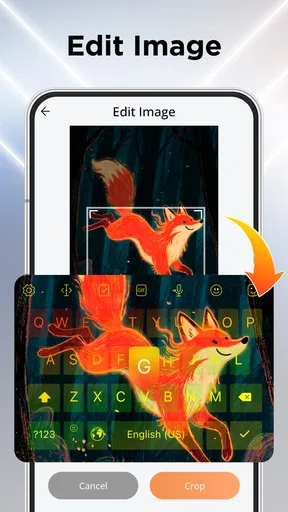
I installed LED Keyboard: RGB Lighting expecting a visual makeover rather than a complete change to the way I type, and that turned out to be the right expectation. This free personalization app from Zayzik : LED Keyboard Studio gives Android users a keyboard built around glowing effects, colorful themes, emojis, and decorative fonts. The first impression is immediate: an ordinary typing area becomes much more noticeable, especially in a dim room or when I want my phone to feel less plain.
What matters more, though, is what remains after the novelty wears off. A bright keyboard can be fun for a few days, but a keyboard is something I use constantly, so comfort, readability, switching habits, and visual fatigue matter more than a dramatic first screenshot. My experience is that this app works best for people who genuinely enjoy customizing their phone and are willing to choose a practical design rather than simply the most dazzling one.
From an exciting first week to an everyday typing habit
During the first week, the appeal is easy to understand. The glowing typing effects make routine messages feel more personal, while the available emojis, fonts, and themes let me adjust the keyboard to match my mood. I found myself opening the customization options simply to see how different styles changed the feel of the same keyboard. That sense of discovery is the strongest part of the experience.
The app is also approachable because it is aimed at ordinary phone users, not people who want to study complicated customization tools. I could think in simple terms: brighter or calmer, more colorful or more restrained, playful or easier to read. That makes it a natural choice for someone who wants a visible change without redesigning the entire phone interface.
There is a useful distinction between a theme that looks good in a preview and one that works while typing quickly. Some highly decorative choices can make the letters compete with the background, particularly when the screen is already busy. I recommend testing a theme by writing a normal message, searching for a contact, and correcting a few mistakes. If the keys remain easy to identify while doing those ordinary tasks, the design has practical value; if I have to pause to find letters, the visual effect is costing more than it gives.
The glowing effects are most enjoyable in short, social interactions. Sending a message, adding expressive emojis, or changing the appearance before a night out makes the keyboard feel like an accessory. I would not call that a productivity improvement, but personalization does not always need to improve speed. Sometimes the point is simply to make a familiar device feel more like mine.
One small but important habit is to keep a dependable layout in reserve. I prefer to experiment with colors and effects while keeping the letter arrangement familiar. A design that changes too many visual cues at once can slow me down, especially when I am replying quickly. This is one of the app’s less obvious trade-offs: the more dramatic the customization, the more carefully I need to protect basic readability.
The app has clearly reached a large audience. It carries a 4.5 average from around 581 thousand ratings and has passed 50 million installs, which tells me that the colorful keyboard idea has broad appeal. Popularity does not guarantee that every theme will suit every user, but it does make the app feel like an established option rather than an obscure experiment.
Who gets the most from the visual makeover
I would recommend it first to people who treat their phone as a personal style object. If you enjoy changing wallpapers, icons, lock screens, or chat colors, a glowing keyboard fits naturally into that routine. It is especially appealing to users who find the default keyboard visually dull and want emojis and decorative type choices close at hand.
It can also work well for a shared-device situation where each person wants a recognizable style, although I would still check that the chosen design remains legible for everyone using the phone. A teenager looking for a colorful interface, a casual user who enjoys themed messaging, or someone refreshing an older Android phone may appreciate the immediate difference more than a person who wants a nearly invisible utility.
On the other hand, I would skip it if typing accuracy and visual quiet are my only priorities. The standard keyboard already does the essential job, and mainstream keyboard alternatives often put more emphasis on prediction, language support, voice input, or a restrained interface. This app’s identity is decorative first. Choosing it means accepting that appearance is part of the experience, not merely an optional layer.
What stays useful after the first month
After the initial excitement, the app’s recurring value depends on whether I actually enjoy revisiting the design. The themes and effects can keep the keyboard feeling fresh, but only if I use the customization rather than choosing one bright style and forgetting about it. For me, the lasting benefit is not constant novelty; it is having a keyboard that feels more expressive during everyday conversations.
That value is strongest when customization follows a purpose. I might use a calmer theme for work messages, a more colorful one for personal chats, or a font that makes the keyboard feel distinctive without interfering with recognition. Even without changing it frequently, the ability to shape the interface can make the phone feel less generic.
There is also a practical workflow that improves the experience: start with the keyboard style I can read fastest, then add visual intensity gradually. I would first select a clear theme, type for a day, and only then test brighter effects or more decorative fonts. This avoids confusing “more noticeable” with “better.” It is a simple approach, but it helps separate a design I admire from one I can comfortably use for weeks.
The app’s free entry point matters here. I can try the core experience before deciding whether the visual customization deserves more attention. Optional purchases range from $2.49 to $139.99 per item, so I would pay close attention to the purchase screen and avoid treating every extra as necessary. The free version is enough to judge whether the keyboard belongs in my routine; spending should come only after I know I will keep using it.
That pricing range also changes how I evaluate the app over time. A keyboard theme is not automatically worth paying for simply because it looks polished in a preview. I would ask whether it improves my daily enjoyment for more than a brief burst and whether I can still read it comfortably at different brightness levels. For a personalization app, recurring satisfaction is a better test than the excitement of unlocking another visual option.
The maintenance that a colorful keyboard quietly creates
Every custom keyboard adds a small amount of maintenance. I need to remember that the keyboard is an active input method, not just a wallpaper. After an operating-system update or a change in my phone’s settings, I would check that it still appears when I need it and that the selected design has not become awkward in a particular app. This is not a reason to avoid the app, but it is part of living with a customized keyboard.
I also recommend reviewing the keyboard choice after installing it rather than rushing through setup. Android’s keyboard settings can include several input methods, and accidental switching can be frustrating when I am trying to answer a message. Keeping the preferred keyboard easy to identify reduces that friction. If I regularly move between phones or use multiple devices, I should expect to spend time recreating my preferred look instead of assuming every personal setting will follow me automatically.
Theme maintenance is another consideration. A style that looks excellent at night may be tiring in bright daylight, while a pale design can become difficult to distinguish in a dark room. I would keep one dependable, high-contrast option available and treat more dramatic designs as occasional choices. This is a better long-term strategy than forcing one flashy theme to work in every situation.
Fonts deserve similar caution. Decorative lettering can make a profile or message feel more distinctive, but readability matters more when I am typing names, addresses, or work-related text. My preference is to use expressive fonts sparingly and return to a straightforward style when accuracy matters. That balance lets the app remain fun without turning every message into a visual puzzle.
The developer, Zayzik : LED Keyboard Studio, positions the product around LED-style keyboard personalization rather than trying to replace every phone utility. That focused identity is helpful: I know what I am installing. It also means I should not judge it by the standards of a feature-heavy general keyboard. If I want a tool centered on prediction and efficient writing, another category of app may be a better fit.
Where the novelty begins to fade
The biggest source of fatigue is visual intensity. Glowing effects are attention-grabbing by design, but attention is not always what I want from a keyboard I may use dozens of times a day. After the first week, the animation or brightness that felt exciting can begin to feel like background noise. Choosing a softer effect, a darker theme, or a simpler font helps, but it reduces the dramatic impact that attracted me in the first place.
Another source of fatigue is the temptation to customize constantly. The app encourages experimentation, and that is enjoyable at first. Eventually, though, switching themes becomes a task rather than a benefit. I get more lasting value when I treat customization as an occasional refresh instead of a daily obligation.
There is also a trade-off between personality and consistency. A highly stylized keyboard may look great in a messaging app but feel out of place when entering a password, searching the web, or filling out a form. I prefer a design that remains unobtrusive enough for practical tasks. If the keyboard makes me think about its appearance more than the text I am entering, it has crossed my personal limit.
Users who are sensitive to screen brightness or motion should be especially selective. I would avoid the most intense effects during long typing sessions and choose a calmer presentation for late-night use. The app’s visual concept is not inherently uncomfortable, but its strongest styles can become tiring when used continuously.
Privacy-conscious users may also want to think carefully before replacing a familiar keyboard. Any keyboard is involved in text entry, so I would only use one I feel comfortable selecting as my input method and would review Android’s keyboard settings before making it the default. That is not unique to this app, but it is an important reason not to install a decorative keyboard casually and forget about the broader role it plays.
How it compares with the usual keyboard choices
Compared with the keyboard that comes preinstalled on an Android phone, this app is much more expressive. The default option usually wins on familiarity and low maintenance, while LED Keyboard: RGB Lighting wins when I want the keyboard itself to contribute to the phone’s visual personality. The choice is less about which one is universally better and more about whether decoration is worth becoming part of my daily typing routine.
Compared with productivity-focused alternatives, its advantage is clearer visual identity rather than smarter writing assistance. A conventional keyboard may be preferable for someone who writes long emails, switches languages often, relies heavily on prediction, or wants the least distracting layout possible. I would choose this app for atmosphere and customization, not because I expect it to transform my typing speed.
It also differs from a simple wallpaper or icon pack because I interact with the keyboard directly. That makes the customization more personal, but it raises the standard for comfort. A wallpaper can be beautiful without affecting accuracy; a keyboard theme has to look good while I am pressing keys quickly and correcting mistakes. That is why testing a design in real conversations is more useful than judging it from a preview alone.
The app supports Android versions beginning with 7.0, so it is relevant to people using older compatible phones as well as newer devices. It is rated for Everyone, which matches the straightforward, decorative nature of the experience. Its current version is 20.0.9, and the app has been available since January 9, 2019, giving it a longer presence than a brand-new customization release.
My long-term verdict on keeping it installed
After living with the app, I see it as a good choice for someone who wants the keyboard to be part of their phone’s style rather than a background utility. The first-week appeal is genuine, and the themes, emojis, fonts, and glowing effects give me enough control to create a look that feels more personal than the standard keyboard.
Its long-term success depends on restraint. I would keep it installed if I found one or two readable themes that made everyday messaging more enjoyable without demanding constant adjustment. I would remove it if the effects became distracting, if switching keyboards became annoying, or if I discovered that I cared more about predictive typing and quiet efficiency than visual customization.
The lasting value is not the brightest effect; it is finding a style I can use comfortably every day. That is the practical lesson I took from reviewing it. Start with readability, test the keyboard in real situations, keep a calmer design available, and treat paid extras as optional rather than essential. With that approach, the app earns a place on the phone for users who genuinely enjoy personalization.
For me, it is worth recommending to a friend who wants a colorful, expressive keyboard and understands that appearance comes with a little maintenance. It is not the right recommendation for someone seeking the most discreet or productivity-oriented typing tool. As a free app in the personalization category, it makes a convincing first impression; whether it stays installed for months depends on choosing comfort over spectacle when the novelty begins to fade.
Verdict
Strengths of LED Keyboard: RGB Lighting
- Offers colorful RGB effects for a more personalized keyboard.
- Can make typing easier in dim environments.
- Includes multiple lighting styles to match different moods.
- Adds a decorative touch to compatible Android devices.
- Lightweight app with a simple setup process.
Limitations of LED Keyboard: RGB Lighting
- May require extensive permissions to function as a keyboard.
- RGB effects can increase battery consumption during use.
- Some themes or features may be locked behind ads or purchases.
- Lighting customization may be limited on certain devices.
- Third-party keyboard use can raise privacy concerns when typing sensitive data.
Similar Picks in This Category
View All
Microsoft SwiftKey AI Keyboard
SwiftKey4.3

Wallpapers
Google LLC4.1

Zedge™ Wallpapers & Ringtones
Zedge4.7

Yandex Browser with Alice AI
Direct Cursus Computer Systems Trading LLC4.3

Ringtone Maker:create ringtone
Big Bang Inc.4.7

Fonts Keyboard
Fonts Keyboard3.9
Frequently Asked Questions
What is LED Keyboard: RGB Lighting and what does it do?
LED Keyboard: RGB Lighting is a customization app designed to give your phone keyboard a more colorful, gaming-inspired appearance. After installing it, you can typically choose from animated RGB effects, neon colors, gradients, and different visual themes. It is mainly focused on changing the keyboard’s look rather than adding advanced typing tools, so users should view it as a personalization utility instead of a full productivity keyboard.
Is LED Keyboard: RGB Lighting safe to use on my Android device?
The app can be used safely when downloaded from a trusted official store and installed with normal caution. However, keyboard applications may request permission to become an active input method, which means they can technically process text entered through the keyboard. Before enabling it, review the developer information, privacy policy, requested permissions, and store reviews. Avoid entering sensitive information until you are comfortable with the app’s privacy practices.
Does LED Keyboard: RGB Lighting support all phones and messaging apps?
Compatibility can vary depending on your Android version, device manufacturer, screen size, and the keyboard system already installed on your phone. The keyboard may work in common messaging and social media applications, but certain apps can restrict custom keyboards or display effects differently. If the RGB design does not appear everywhere, switching back to the default keyboard and checking the app’s settings or update status may help.
Will using the RGB keyboard affect battery life or phone performance?
Animated lighting effects can use slightly more battery and system resources than a simple static keyboard, especially when bright animations remain active while you type for long periods. On newer phones, the difference is usually modest, but older or less powerful devices may show occasional lag or faster battery consumption. Choosing a static theme, lowering animation intensity, and disabling unnecessary effects can improve performance.
Is LED Keyboard: RGB Lighting free, and does it include advertisements or purchases?
The app may be available to download at no initial cost, but free versions of keyboard customization apps commonly include advertising, optional premium themes, or in-app purchases. The exact pricing and available features can change with updates, so check the Google Play listing before installing. Also review any trial terms carefully, particularly if premium effects or ad removal require a recurring subscription rather than a one-time payment.
